User Review (3)  Go to Mac ->
$31.20 $15.60 50% OFF
MTS format is used by HD camcorder of Sony, Panasonic and Canon. It is a high-definition recording format. However if you want to play MTS file on iPod, iPhone, or other players, you must convert MTS to those players supporting formats. Then MTS Converter can do it. This advanced and versatile MTS Video Converter can convert MTS to AVI, MTS to MP4, MTS to VOB, MTS to iPod/iPhone and others.
In addition to the video conversion function, MTS Converter acts as audio converter or audio extractor to create your own music from videos, and convert all popular audios to AAC, MP3, M4V, MP2, WAV, WMA with high speed. Multiple Editing Capabilities in this MTS Video Converter allows you to trim, crop, merge, and watermark your video according to your needs.


MTS Converter makes it practical to convert MTS, M2TS, TS and more to iPod, iPhone MP4, etc.
In this MTS Video Converter, you are easy to get music from MTS, TS and other videos, and from all popular audio formats.
The converted video and audio files can be put into various popular players, like iPad mini 2, iPhone, iPod, Apple TV, Palm Pre, etc.

MTS Converter can merge your selected video sources into one file for you to enjoy conveniently.
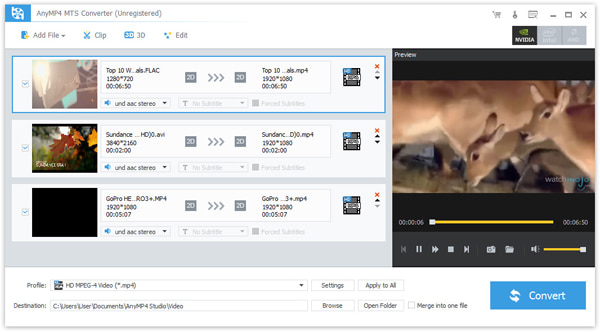
You can preview the original video and output video effect at the same time with MTS Converter, and adjust the video effect by modifying the video Contrast, Brightness, Saturation, Hue and Volume.
This MTS Converter has the Trim function to cut off any time-length video clips from your video source file.
Its Crop function is to adjust the size of video play region and the output aspect ratio to get the perfect playing effect.
Personalize your video by adding watermark in the form of text or image.

Select you need audio track and subtitle for output video. You can also choose the output video format for your player from the drop-down list.
All the detailed video and audio settings are provided for you to choose, such as Video Encoder, Resolution, Frame Rate, Video Bitrate, Audio Encoder, Sample Rate, Channels, Audio Bitrate. All settings can be saved as user-defined profile for your future use.

MTS Converter is really easy to use. The whole process of conversion can be finished just in a few of clicks.
MTS Converter adopts NVIDIA® CUDA™ technology, which provides you with the fastest conversion speed(6X faster), completely support multi-core CPUs.
Screenshot
Reviews
Reference
OS Supported: Windows 11, Windows 10, Windows 8/8.1, Windows 7
Hardware Requirements: 800MHz Intel or AMD CPU, or above; 512MB RAM or more
| Support Input File Formats | |
| Video | MPG, MPEG, MPEG 2, VOB, DAT, MP4, M4V, TS, RM, RMVB, WMV, ASF, MKV, AVI, 3GP, 3G2, FLV, SWF, MPV, MOD, TOD, QT, MOV, DV, DIF, MJPG, MJPEG |
| HD Video | HD TS, HD MTS, HD M2TS, HD MPG, HD MPEG, HD MP4, HD WMV, QuickTime HD MOV, HD H.264, HD RM |
| 4K UHD Video | MP4, TS, MKV, AVI, FLV, WebM, MOV, MXF |
| Audio | MP3, MP2, AAC, AC3, WAV, WMA, M4A, RM, RAM, OGG, AU, AIF, AIFF, APE, FLAC, NUT |
| Support Output File Formats | |
| Video | AMV, MP4, ASF, AVI, 3GP, WMV, DV, VOB, FLAC, FLV, MKV, MOV, TS, M4V, 3G2, MPG, MTV, DPG, SWF, DivX, XviD |
| 4K UHD Video | MP4, WebM, TS, AVI, FLV, MKV |
| Audio | AAC, AC3, AIFF, AMR, AU, M4A, MKA, MP3, MP2, OGG, WAV, WMA |
| Snapshot Image | JPEG, GIF, BMP |
| Support Devices | |
| iPad (iPad Pro, iPad mini 4, iPad Air 2), iPhone (iPhone 17/Air/17 Pro/17 Pro Max, iPhone 16/16 Plus/16 Pro/16 Pro Max, iPhone 15/15 Plus/15 Pro/15 Pro Max, iPhone 14/14 Plus/14 Pro/14 Pro Max, iPhone 13/13 Pro/13 Pro Max/13 mini, iPhone 12 Pro Max/12 Pro/12/12 mini, iPhone 11 Pro Max/11 Pro/11, iPhone XS/XS Max, iPhone XR/X, iPhone 8/8 Plus, iPhone 7/7 Plus, iPhone 6/6 Plus), iPod (iPod touch, iPod nano, iPod classic), Apple TV Android devices: Samsung, HTC, Motorola, LG, Acer, Dell Mobile phones: BlackBerry, Nokia, Motorola, LG, Sony Ericsson, Sony Xperia, Sony Walkman NDS, PSP, PS3, Wii, Xbox 360 Archos, Creative ZEN, iRiver, Sony Walkman, ZEN Player, Zune, Sansa General Pocket PC, HP iPAQ, Palm Pre, etc. |
|
Tutorials & Articles
Our Users Are Also Downloading
 Video Converter Ultimate
Rip homemade DVD and convert videos to other formats.
Free Download Buy Now DVD Creator
Provides the best solution to convert any video format to DVD disc, DVD folder and ISO file.
Free Download Buy Now Blu-ray Player
Play Blu-ray movies including Blu-ray discs, Blu-ray folder and ISO file on PC.
Free Download Buy Now